
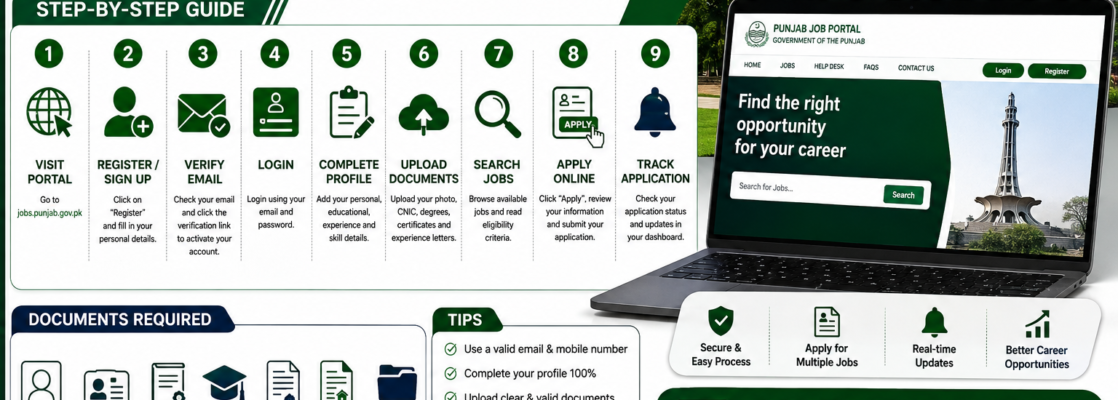
If you want to apply for Punjab Government jobs, you must first create an account on the Punjab Job Portal. After registration, you can build your profile, upload documents, and apply for available vacancies online. (Punjab Jobs)
Step 1: Visit the Punjab Job Portal
Open the official Punjab Job Portal:
Click the “Register” or “Sign Up” button on the homepage. (Punjab Jobs Portal)
Step 2: Create Your Account
Enter the required information:
- Full Name
- CNIC Number
- Email Address
- Mobile Number
- Password
Make sure you use a valid email address because the portal will send an activation link to verify your account. (Punjab Jobs Portal)
Step 3: Verify Your Email
After registration:
- Open your email inbox.
- Check for an email from the Punjab Job Portal.
- Click the verification/activation link.
- Your account will be activated successfully. (Punjab Jobs Portal)
Step 4: Login to Your Account
Return to the portal and log in using your:
- Email Address
- Password
Once logged in, you can access the Profile Builder section. (Punjab Jobs)
Step 5: Complete Your Profile
Fill in all required information carefully:
Personal Information
- Full Name
- Father’s Name
- CNIC Number
- Date of Birth
- Gender
- Domicile
- Address
Educational Information
Add all academic qualifications, including:
- Matric
- Intermediate
- Bachelor’s Degree
- Master’s Degree (if applicable)
Candidates are advised to enter complete educational details to avoid issues during online application processing.
Experience Details
- Organization Name
- Designation
- Employment Duration
- Responsibilities
Skills & Certifications
- Technical Skills
- Professional Certifications
- Computer Skills
- Training Courses
Step 6: Upload Required Documents
Upload clear scanned copies of:
- Recent Passport-Size Photograph
- CNIC (Front & Back)
- Domicile
- Educational Certificates
- Degrees
- Experience Certificates
- Other supporting documents required by the job advertisement
Some departments may ask for additional documents depending on the vacancy.
Step 7: Search for Available Jobs
After completing your profile:
- Click on Jobs.
- Browse available vacancies.
- Select the position that matches your qualifications.
- Read the eligibility criteria carefully. (Punjab Jobs)
Step 8: Apply Online
To apply:
- Open the job advertisement.
- Click the Apply button.
- Review your profile details.
- Submit your application.
Only online applications submitted through the Punjab Job Portal are accepted for most Punjab Government vacancies. (Punjab Jobs)
Step 9: Track Your Application
After submission, you can log in anytime to:
- View Applied Jobs
- Check Application Status
- Receive Test or Interview Updates
- Download Application Details (if available)
Tips for Successful Application
✅ Use an active email address and mobile number.
✅ Complete your profile 100%.
✅ Upload clear and readable documents.
✅ Double-check your CNIC and educational information.
✅ Apply before the deadline to avoid last-minute issues.
✅ Regularly check your email and dashboard for updates.
Final Words
Creating an account on the Punjab Job Portal is a simple process that takes only a few minutes. Once your profile is complete, you can apply for hundreds of Punjab Government jobs with a single account. Keeping your profile updated will also make future applications faster and easier. (Punjab Jobs)